Postgraduate Exam Photo
Graduate entrance exam registration photo. 3:4 portrait ratio, JPG/JPEG ideally under 10 MB, plain white or blue background, no makeup or retouching.
- Digital size
- 3:4
- Background
- White/Blue
- Head height
- Head and shoulders fill about 2/3 of the frame; eyes 30-50% down from the top edge
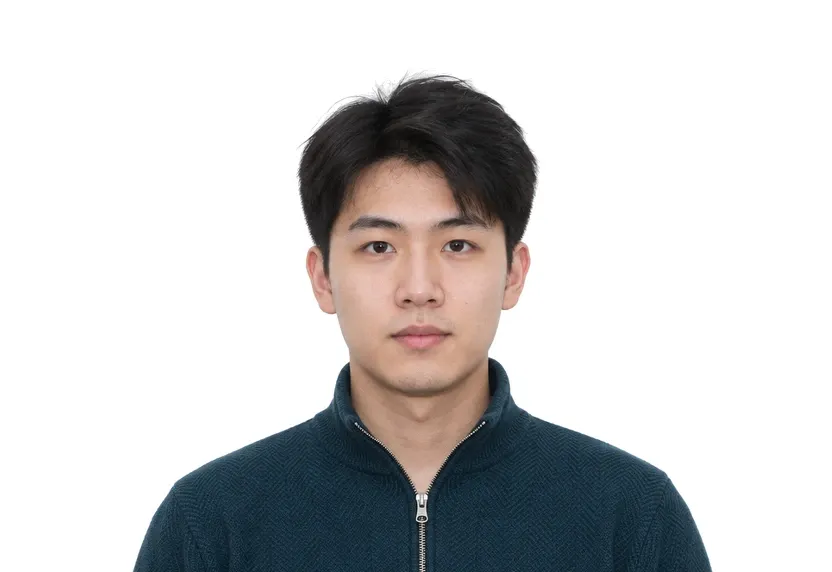
Size & specifications
Postgraduate Exam Photo — requirements
| Printed size | — |
|---|---|
| Digital size | 3:4 portrait ratio, e.g. 600×800 px |
| Head height | Head and shoulders fill about 2/3 of the frame; eyes 30-50% down from the top edge |
| Background | White/Blue |
| Resolution | ≥ 300 DPI |
| Recency | Within 3 months |
| Glasses / expression | Not allowed (including contact lenses and cosmetic lenses) · Natural, lips closed; face level within ±10 degrees |
| Digital format | JPG or JPEG, ideally under 10 MB, 3:4 aspect ratio |
One upload, two deliveries: the pixel-exact digital file and a 300 dpi print-ready sheet.
What each line means
Digital size — the digital file must measure 3:4 portrait ratio, e.g. 600×800 px. Anything smaller gets refused by many online systems before a person sees it.
Head height — your head, crown to chin, should span Head and shoulders fill about 2/3 of the frame; eyes 30-50% down from the top edge. Too small reads distant; too large and the crop will not fit.
Background — a plain White/Blue background, with no shadows or gradients. A wall lit unevenly is the fastest route to a refusal.
Resolution — 300 dpi keeps a face sharp in print. Below that, features soften and agencies ask for a retake.
Recency — Within 3 months. Hair, glasses and weight change faster than people assume, and the officer compares the photo with you at the counter.
Glasses / expression — glare on lenses hides the eyes, and hidden eyes are an automatic rejection in most systems. If you wear glasses, read this line twice.
Digital format — some portals accept a single file type and quietly refuse everything else. Check what you are handing over before you upload.
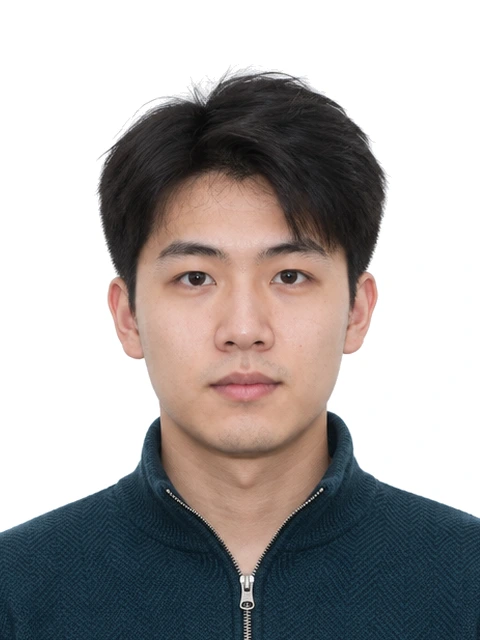
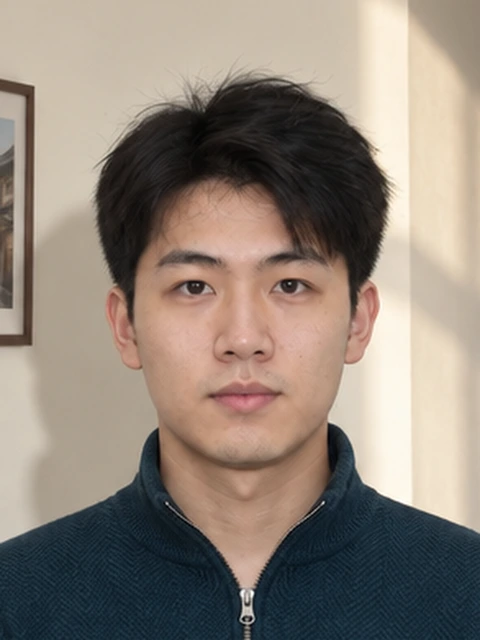
Photo examples
What passes — and what gets rejected.
How to take a Postgraduate Exam Photo with your phone
Registration photo format and orientation
The registration photo for the postgraduate entrance exam is now a 3:4 portrait image in JPG or JPEG format, ideally under 10 MB, on a plain white or blue background. The old 567×390 landscape format is gone. The system checks proportions rather than one fixed pixel count, so shoot vertically. A 600×800 px frame clears the check.
Appearance requirements
No makeup. No glasses of any kind, including contact lenses and cosmetic lenses. No editing and no re-photographing of an existing print: the upload has to be an original that shows how you look now. Hair must not cover the face or cast shadows on it, and the photo must be taken within three months of registering.
Face and head position
Face level and horizontally centred, with rotation, tilt and pitch each within ±10 degrees. Eyes sit 30-50% of the image height down from the top edge. Head and shoulders together fill about two thirds of the frame, shoulders level, ears symmetric, lips closed. The review system measures these positions one by one.
Lighting and tool output
Light evenly from the front: no glare, no shadows, no red-eye, sharp focus. Daylight from a window in front of you is the simplest setup that passes. Evening ceiling lights put shadows under the brow and nose that fail the quality check. Keep the phone at eye level so the head sits square to the camera.
This page crops to the exact 3:4 ratio and outputs a JPG within the size guidance, on a white or blue background of your choice. The check before download covers ratio, format and size, background colour, and the head-and-shoulder proportion.
Why Postgraduate Exam Photo gets rejected
Format and ratio
The 3:4 portrait rule is where old submissions fail. A former 567×390 landscape file now drops out on ratio alone, and no fixed pixel count is required. A 600×800 px vertical shot satisfies the proportion check.
Appearance bans
Makeup of any kind, glasses including contact and cosmetic lenses, edited or re-photographed images: all are named on the banned list. The photo must be an original taken within three months of registering. Hair casting shadows over the face counts as a defect on its own.
Measured positions
Head rotated, tilted or pitched beyond ±10 degrees; eyes outside the 30-50% band from the top edge; head and shoulders filling less or more than about two thirds of the frame; shoulders uneven; ears hidden. The review system checks each position. Run the check on this page first.
Quality faults
Uneven lighting, glare, shadows, red-eye and blur complete the list. The tool checks ratio, format, size, background and composition before download. The fix happens here rather than at registration.
How it works
Photo tips
Frequently asked questions
What size is a Postgraduate Exam Photo?
The standard size is 600 × 800 px (600 × 800 px at 300 DPI). The tool crops and scales your photo to exact requirements automatically.
Can I smile in the photo?
Requirements call for: Natural, lips closed; face level within ±10 degrees. When in doubt, keep a neutral face with both eyes open.
How recent must the photo be?
Within 3 months Old photos are a common rejection reason.
Is my photo private?
Yes. Uploaded photos are encrypted in transit and automatically deleted within 24 hours. We never share or resell uploads.
What are the postgraduate exam photo requirements now?
A 3:4 portrait image, JPG or JPEG, ideally under 10 MB, white or blue background, no makeup, no glasses including contacts, taken within 3 months and not edited.
Why did the format change from 567×390?
The registration system moved to a 3:4 portrait proportion and checks ratios rather than one fixed pixel count. The old landscape format now fails on ratio alone.